
Agentic Explorations: Combining Relevance AI with Make.com
With the growing interest in the agentic approach where AI agents can reason, decide and tool, tools like Relevance AI and Make.com make it easier to build and automate such multi-agent AI systems. This article introduces how Relevance AI enables agent creation and how Make.com assists to connect these agents to external workflows, along with a step-by step guide to integrating both platforms. Think of Relevance as the agent (worker), and Make as the manager who tells Relevance agents what to do and coordinates among them to get bigger tasks accomplished.What is Relevance AI?
- Agents,
- Tools,
- Knowledge.
- In Relevance AI, you have a choice to connect to the following LLMs from where your prompting will be fulfilled:
- OpenAI, Anthropic, Azure-OpenAI, Custom Azure Deployment, Openrouter
- Tools in Relevance AI are modular, reusable components that perform specific tasks within an Agent’s workflow. They act like functional building blocks, designed to carry out focused tasks.
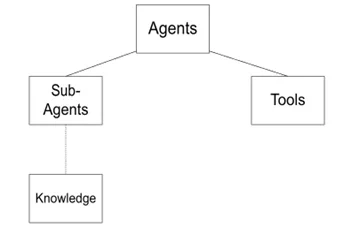 This diagram illustrates the core architecture of Relevance AI, where Agents act as the central orchestrators responsible for managing workflows, making decisions, and coordinating actions. Agents can invoke Tools, which are modular, task-specific components used to perform functions like summarization, classification, or API calls. They can also delegate tasks to Subagents, which are smaller logic units capable of handling subtasks independently. Subagents (and typically Agents as well) can access Knowledge, a structured information base consisting of documents, URLs, or data sources used for retrieval-augmented generation, allowing the system to generate fact-grounded, context-aware outputs. This setup enables scalable, modular, and intelligent AI workflows.For every Agent, there are options of adding:
- Core Instructions: Defines the main prompt(s) that guide the Agent’s behavior and purpose.
- Flow Builder: Used to create a step-by-step instruction path, allowing the Agent to follow a structured logic flow.
- Abilities: Lets schedule the messages, escalate the emails to humans, external communication handling.
- Subagents: Modular agents that handle nested tasks within the main Agent.
- Tools: Modular component working within an Agent, performing specific tasks.
- Metadata: Stores and manages contextual data (like user ID, session info, variables) that the Agent uses during conversations or workflows.
What is Make.com?
- It is an integration and automation development platform that lets you connect apps, services, and data sources to create powerful automated workflows
- You can integrate APIs, schedule tasks, parse data, and connect thousands of services visually.
- Visually design workflows using its intuitive drag-and-drop interface.
- Connect to thousands of apps and APIs, including CRMs, databases, marketing platforms, cloud services, and AI tools.
- Build multi-step scenarios that include data transformations, logic branching, scheduling, error handling, and real-time triggers.
How to Integrate both the platforms:
There are two main ways to connect the platforms: sending data from Make.com to Relevance AI, and sending data from Relevance AI to Make.com.1.Triggering Relevance AI from Make.comIn this method, Make.com serves as the initiator. Data from any app (such as a form, CRM, or email) is sent to a Relevance AI agent or workflow to perform tasks.Steps:- Create a workflow or agent in Relevance AI and add a Webhook as the starting block.
- Copy the webhook URL provided by Relevance.
- In Make.com, create a new scenario and select a trigger module (e.g., a new row in Google Sheets).
- Add an HTTP module and configure it to send a POST request to the Relevance AI webhook with the required data (usually in JSON format).
- In Make.com, create a scenario with a Custom Webhook as the trigger and copy the generated webhook URL.
- In Relevance AI, within your agent or workflow, add a Webhook Tool or HTTP Request block.
- Paste the Make.com webhook URL and send relevant data, such as a classification result, summary, or extracted information.
- Complete the scenario in Make.com with the necessary modules to process the incoming data.