
 A common challenge in fundraising is efficiently identifying and connecting with the right investors. Often, investor lists contain outdated or incorrect email addresses, leading to a high number of bounced emails during outreach campaigns. This makes it difficult to re-engage past contacts or initiate conversations with new prospects.Traditionally, updating and verifying contact information has been a slow and manual process. Reviewing each entry, searching LinkedIn, hunting for emails, and checking their validity takes considerable time and can lead to errors.To address this, a low-code/no-code automation system was developed using make.com.
Understand the whole process
- Initial Investor List: Begin with a Google Sheets list of investors.
- LinkedIn Profile Lookup & Email Verification (Existing Profiles):
- If a LinkedIn profile is already available, the workflow connects to the Apollo.io API.
- It then automatically reviews and verifies the email address associated with the profile.
- Test Result: Achieved 97% accuracy across 69 entries in our tests.
- LinkedIn Profile Discovery & Verification (Missing Profiles):
- If a LinkedIn profile is missing, the workflow performs a Google search to find it.
- This step includes a “smart verification” feature to handle common names, where a team member records and finds the correct LinkedIn profile.
- Once a potential profile is identified, it is scraped and fed into an LLM (Large Language Model) to verify its accuracy.
- If the LLM confirms the profile is correct, it is stored in the spreadsheet; otherwise, the field remains blank.
- Handling Complex Cases (Same Investor/Company Names):
- In situations where the investor and company names are identical, the system extracts the domain from the email field.
- Handling Missing Domains (Email Extraction & LinkedIn Matching):
- If the domain is absent, the system extracts the email from the domain.
- It then finds the corresponding LinkedIn profile and performs the same matching and email pulling process from Apollo, storing the information in the Google Sheet.
- Efficiency and Cost Savings (No LinkedIn/Domain/Old Email):
- If no LinkedIn profile, domain, or old email is available, the system will immediately end the search, saving time and cost.
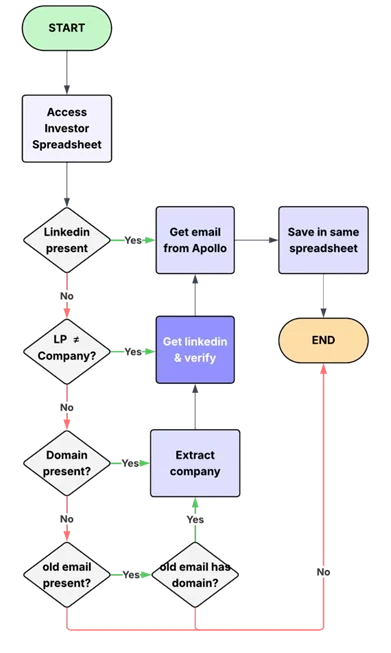 Feel free to review the workflow template. Link