
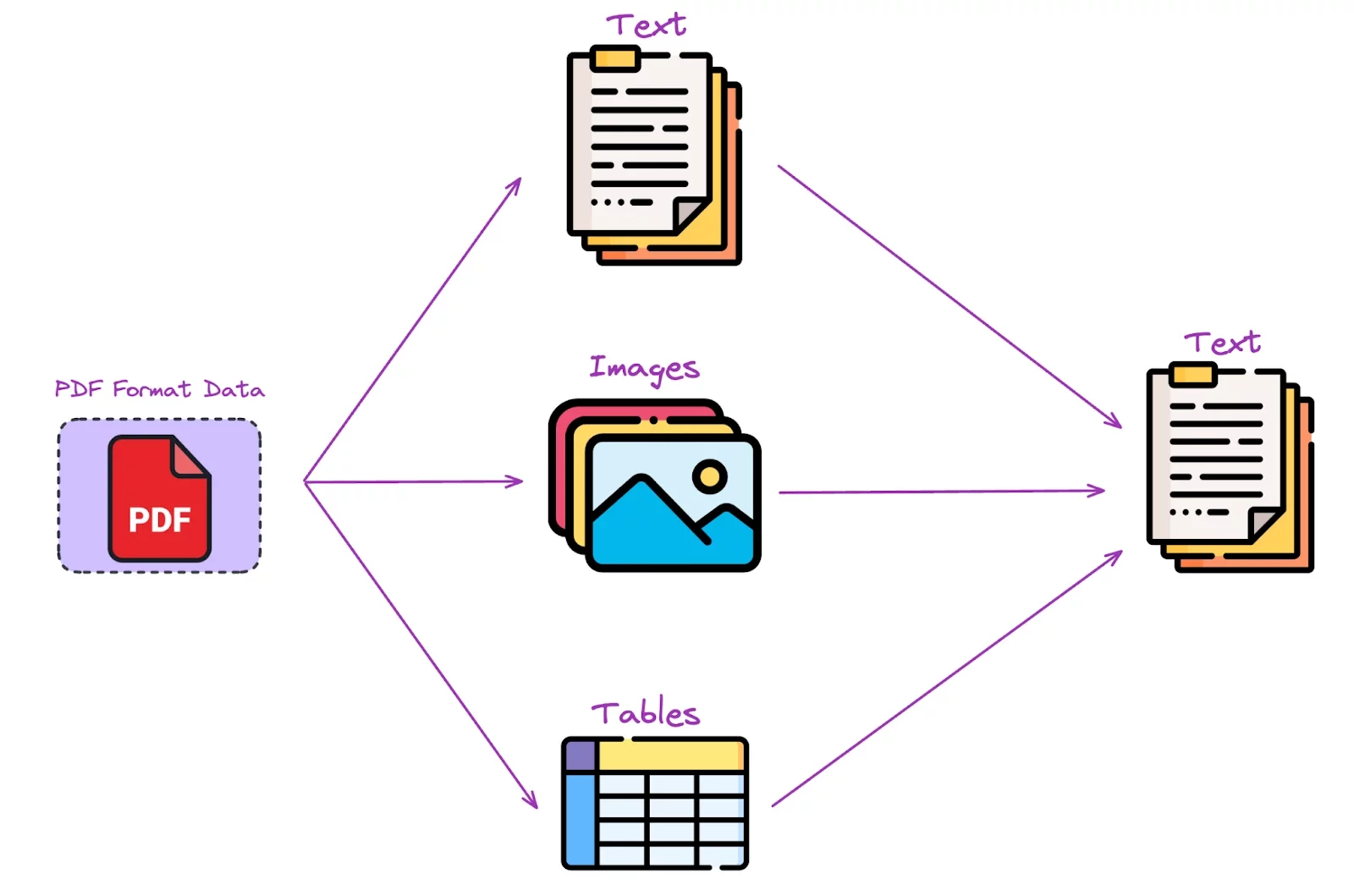
 If you’re building Retrieval-Augmented Generation (RAG) applications, you’ll eventually need to extract text from PDFs. However, PDF extraction is challenging because PDFs store content as a visual representation rather than structured text. This means extracting text, tables, images, and formatting from PDFs for AI applications can be unreliable. Fortunately, AI-powered PDF extractors have improved, making it easier to process PDFs into structured formats for RAG.
Why Does PDF Extraction Matter for RAG?
When you feed a Large Language Model (LLM) with extracted PDF content, accuracy and formatting matter. The way text is extracted—whether it preserves headings, tables, and page layouts—affects how well an AI model retrieves and processes information.A good PDF extractor for RAG should:- Preserve headings and formatting to help LLMs understand context.
- Handle tables, multi-column text, and images correctly.
- Support multiple languages and extract right-to-left text properly.
The Contenders: LlamaParse vs. Unstructured vs. Vectorize
After testing various tools, the top three PDF extractors for AI-powered document processing are:1. Unstructured- Originally built as a PDF library, now a full-fledged cloud-based extraction service.
- Supports three extraction levels: Basic ($2/1,000 pages), Advanced ($20/1,000 pages), and Platinum ($30/1,000 pages).
- Works with LangChain and offers markdown output for structured extraction.
- Built by LlamaIndex, available through Llama Cloud.
- Offers two pricing tiers: $3/1,000 pages for standard parsing, $45/1,000 pages for premium parsing.
- Expensive compared to alternatives but includes free pages each month.
- RAG-as-a-Service platform with built-in Fast Extractor (free with RAG pipelines).
- Vectorize Iris (advanced extraction) available for $15/1,000 pages.
- Lowest cost among hosted options but only available within Vectorize’s RAG ecosystem.
Comparison of Extraction Performance
The extractors were tested on different PDF types to evaluate their accuracy in real-world AI applications.1. Simple Text PDFsTest: Extracting text from a plain-text PDF (Pride and Prejudice from Project Gutenberg).Results: All three extractors performed well, with no major issues.- Unstructured preserve exact paragraph spacing better.
- Unstructured handled column formatting best and avoided merging text from different columns.
- LlamaParse struggled, often merging content across columns incorrectly.
- Vectorize did well, keeping column content separate, but it sometimes misclassified headers. 🔹 Winner: Unstructured – Best at keeping the multi-column layout intact.
- Unstructured reversed word order, making the output unreadable.
- LlamaParse kept word spelling correct but still extracted text left-to-right instead of right-to-left.
- Vectorize fully preserved word order, spelling, and RTL layout. 🔹 Winner: Vectorize – Only tool that correctly handled Arabic text direction.
- Unstructured struggled, often mixing unrelated text blocks together.
- LlamaParse correctly separated content sections but misclassified some headings.
- Vectorize accurately preserved text sections and image captions, making it ideal for RAG. 🔹 Winner: Vectorize – Best at handling complex layouts with images.
- Unstructured failed completely, outputting a blank result.
- LlamaParse extracted most of the text correctly but had minor errors in names and dates.
- Vectorize extracted everything perfectly, even handling distorted text. 🔹 Winner: Vectorize – Best for scanned document OCR.
- Unstructured extracted raw numbers but lost table formatting completely.
- LlamaParse preserved tables well but sometimes misclassified table headers.
Final Verdict: Best PDF Extractor for RAG?
Here’s how each tool performed across different PDF types: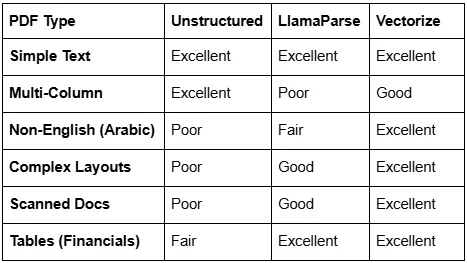 Best Overall: Vectorize
- Best at handling complex layouts, non-English text, and scanned documents.
- Strong table formatting for financial/legal applications.
- Only downside: Requires using Vectorize RAG ecosystem.
- Great for structured documents and financial data.
- Expensive ($45/1,000 pages) and struggles with multi-column PDFs.
- Works well with plain text PDFs.
- Fails with scanned documents, tables, and non-English text.