
 Git is an essential tool for developers, helping them track changes, collaborate, and manage code efficiently. If you are new to Git or want to improve your skills, Simplilearn’s Git tutorial provides a structured learning path. This article breaks down key Git concepts from the tutorial, making it easy to understand and apply in real-world projects.Git is a version control system that helps developers track, manage, and collaborate on code. Whether working alone or in a team, Git keeps track of changes, allowing you to undo mistakes, work on multiple features at the same time, and merge code seamlessly.
Why is Git Important?
- Tracks Changes – Saves different versions of code, so you never lose progress.
- Collaboration-Friendly – Allows multiple developers to work on the same project without conflicts.
- Backup & Recovery – Helps restore previous versions if something breaks.
- Branching & Merging – Enables developers to work on different features simultaneously and merge them later.
- Industry Standard – Used by companies and open-source projects worldwide.
Getting Started with Git
To use Git, you need to:1️⃣ Install Git – Download and install Git from git-scm.com.2️⃣ Configure Git – Set up your username and email using:git config –global user.name “Your Name” git config –global user.email “your.email@example.com”3️⃣ Initialize a Repository – Start tracking a project using:git init4️⃣ Add & Commit Files – Stage and save changes:git add filename git commit -m “Initial commit”5️⃣ Push to a Remote Repository – Upload your code to GitHub or GitLab:git push origin mainImportant Git Concepts
Understanding Git commands and workflows is key to mastering Git. The Simplilearn tutorial covers all major Git concepts, including:1. Git RepositoriesA repository (repo) is where Git stores project files and history. It can be local (on your computer) or remote (on GitHub, GitLab, or Bitbucket).- Local Repo – Code stored on your computer.
- Remote Repo – Code stored online for collaboration.
- Staging – Add files to be tracked (git add).
- Committing – Save changes with a message (git commit -m “message”).
- Pushing – Upload changes to a remote repo (git push).
- Create a new branch – git branch feature-branch
- Switch to a branch – git checkout feature-branch
- Merge a branch – git merge feature-branch
- Undo the last commit – git reset –soft HEAD~1
- Remove changes from a file – git checkout — filename
- Revert to an older commit – git revert commit-id
Git vs GitHub: What’s the Difference?
Many beginners confuse Git with GitHub. Here’s the difference: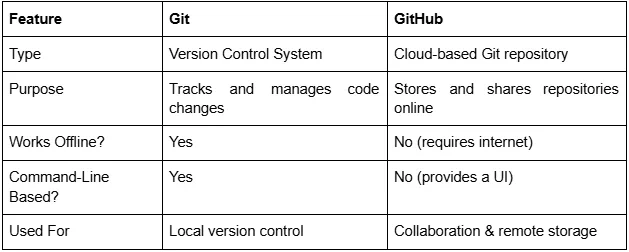 Git is the tool, and GitHub is the hosting platform. You can use Git without GitHub, but GitHub makes collaboration easier.
Final Thoughts:
Git is a must-have skill for developers, data scientists, DevOps engineers, and IT professionals. The Simplilearn tutorial breaks Git down into simple steps, making it easy to understand and apply in real-world projects.If you are new to Git, start with:- Basic commands – git init, git add, git commit, git push
- Branching & merging – git branch, git merge
- Undoing mistakes – git reset, git revert